
It means you've used up your plan's share of Claude for now. The message tells you when you can start again.
I used to see it a lot. About five months ago, I was building several workflows and dashboards at once, and I kept running out partway through my 5-hour window on the Pro plan. So I upgraded to Max.
Now I'm back on Pro.
Your plan has two limits: every 5 hours and every week
Pro and Max have two usage limits.
- The 5-hour session. It starts when you send your first message, and your limit resets in full five hours later. It isn't a fixed clock like 9 to 2. It starts with you.
- The weekly limit. On top of that, there's a cap for the whole week. It resets at a fixed day and time assigned to your account, no matter when you start using Claude.
Your usage is sharedThat includes the Claude app on your phone. A long chat there counts against the same limit as your Claude Code sessions. across Claude chat and Claude Code.
How to see how much of your limit is left
Look at the bottom right of the Claude desktop app, just below the message box. Next to the model, thinking level, and mode, there's a small circle that fills in as you use your limit. Click it, and a popup shows how much of your 5-hour session and your week you've used, and when each one resets.
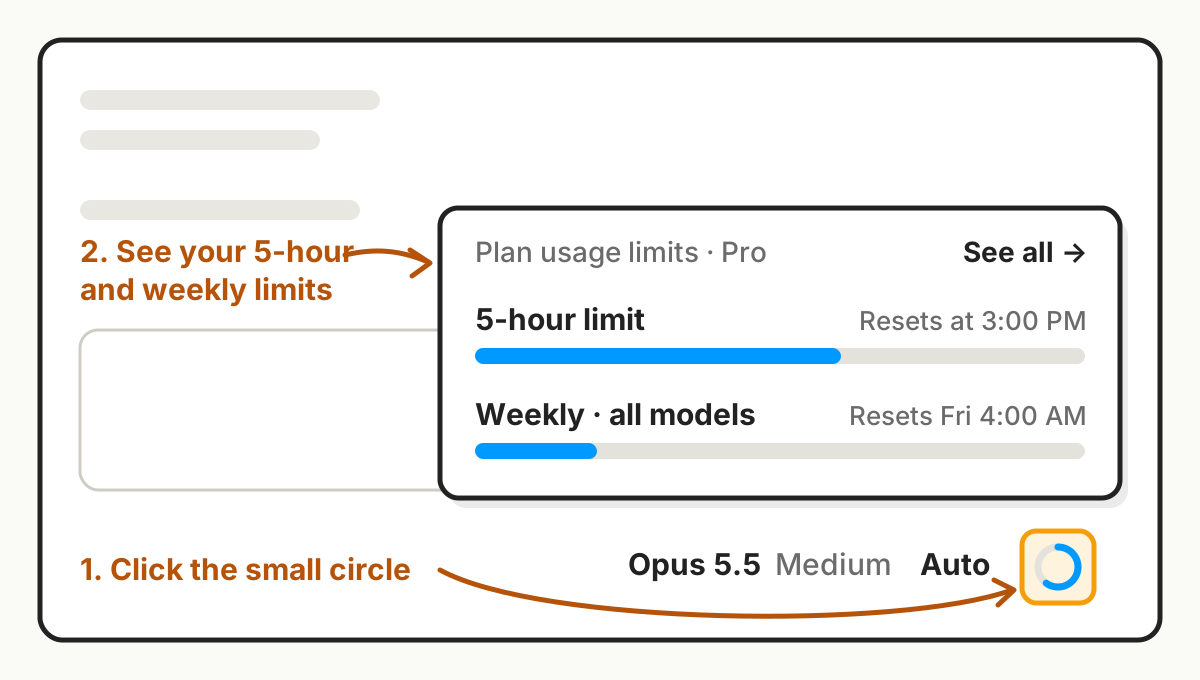
You can also go to Settings, then Usage.
What uses up your tokens faster
Usage is counted in tokens, the small chunks of text the AI reads and writes. Anything that adds tokens burns through your limit faster.
1. Bigger models and more thinking. Bigger models and higher thinking levels use more of your limit for the same request. Which model to pick, and how much thinking to ask for, is an upcoming AI 101 post.
2. Long conversations. Each time you send a message, the AI rereads the whole conversation from the top. So messages in a long conversation use more of your limit than messages in a short one. That's one more reason to start a fresh conversation when the context window gets full. A new conversation doesn't reset your usage limit, though.
3. Big files and tools. Large attachments, and tools that read lots of files or web pages, add tokens fast.
Start the 5-hour timer early
On days I know I'll use a lot of AI, I start the clock early.
When I wake up, I open the Claude app on my iPhone, switch to Haiku, Claude's smallest and cheapest model, and say "hi." Because usage is shared, that starts my 5-hour window for Claude Code too. By the time I sit down to work, part of that window has already passed, so it resets earlier than it would have.
Here's an example. I send hi at 6 am and start working at 9. If I run out at 10:30, I wait half an hour, not three and a half.
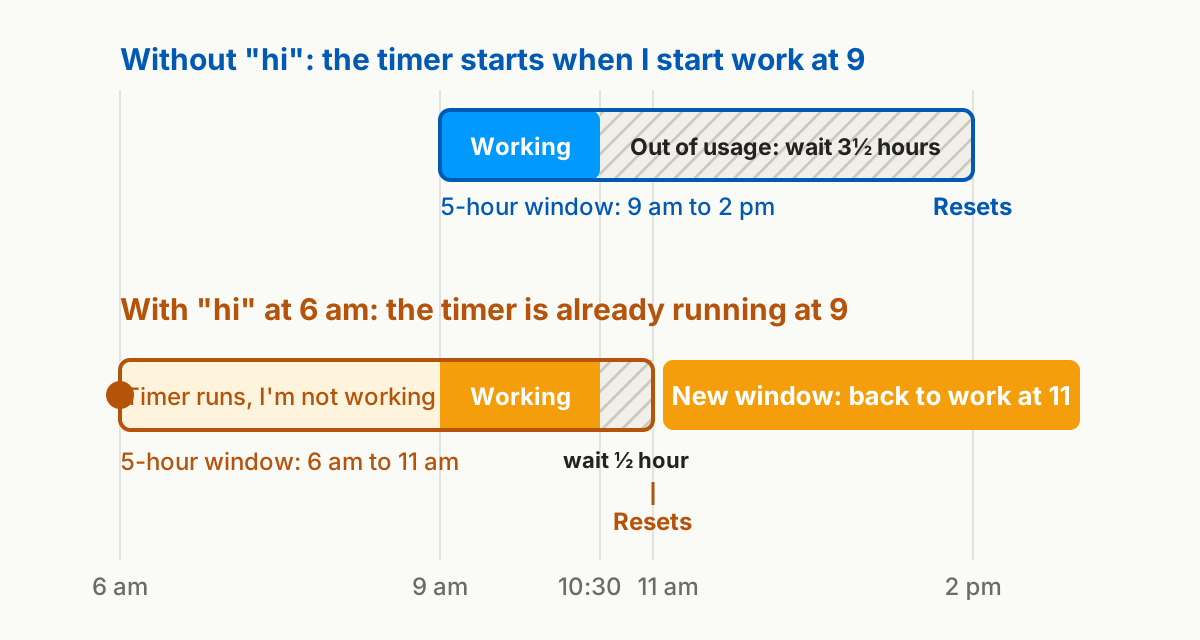
This only moves the 5-hour clock. It doesn't add to your weekly limit.
When the Max plan is worth the upgrade
Pro is $20 a month. Max is $100 a month and gives you 5 times Pro's usage, both every 5 hours and every week. There's also a $200 plan for even heavier usePlans and prices change often, so check Claude's pricing page before you decide..
Max was worth it for me when I hit the limit week after week, not just on one busy day. I was building several workflows and dashboards at once. I was also designing complex websites, and I used Fable, Claude's most powerful model, for those.
Two things brought me back to Pro. First, Opus 5.5 came out. It's really good at website design, at visual work like animations and videos, and at reasoning. I no longer need FableFable is no longer included in the Pro plan's usage. On Pro, it runs on usage credits, which you pay for separately.. Second, I run Opus 5.5 on medium thinking instead of high, which uses fewer tokens.
I may upgrade again in a busy month, but not today.
If you hit the limit once in a while, Pro is fine. Wait for the reset, or start your clock early on the days you'll need it. If you hit it most days and it's slowing real work, that's when to look at Max.
Plan your heavy AI work around your 5-hour window. Start the timer early, save the bigger models for work that needs them, and start a fresh conversation when one gets long.