
If you're in academic medicine, you write letters of recommendation. Most of mine are for faculty up for promotion, hiring, and awards. A solid letter used to take me 4 to 6 hours to write. Now it takes me about 30 minutes.
Getting there meant answering two things: whether Claude Code could learn how I write a letter, and how I'd know if it did.
What you'll build
In this post, you'll build a project with Claude Code that drafts letters of recommendation in your voice. It comes in three parts:
- Part A: Teach it your voice. Claude Code reads your past letters, writes up your style, and interviews you about what the letters don't show.
- Part B: Draft a letter together. It asks you about the candidate, drafts the letter, and revises it with your edits.
- Part C: Test it. You pick a letter you've already sent, have Claude Code draft that same letter, and compare the AI draft with the letter you actually sent.
This project assumes you've done the steps in 5 Things to Do When Setting Up Claude Code, including your privacy settings. The steps use Claude Code in the Claude desktop app on a Mac. If you use ChatGPT, OpenAI's CodexCodex calls its instructions file AGENTS.md instead of CLAUDE.md. In these prompts, replace every CLAUDE.md with AGENTS.md. is its version of Claude Code, and the same prompts work there.
Whose data is this?
Letters and CVs carry other people's details. More institutions now offer coding agents like Claude Code to their faculty. If yours does, this project fits there. Whether it's OK to run on a personal paid plan is your call, and your institution's rules come first.
I used my personal plan for the test, because the letters were old ones I'd already sent.
Part A: Teach it your voice
1. Gather your past letters
Collect the letters you've already sent. Ten or more is a good start.
If you write for one group, like residents, that's all the sorting you need. If you write for several groups, Claude Code will sort them for you in step 3. A letter for a resident applying to fellowship reads differently from one for a faculty member up for promotion, so it helps to learn each one separately. My letters sort into two groups: faculty and residents.
2. Save one letter for the test
How will you know if the draft really sounds like you? Test it against a letter you've already sent.
Pick one letter you sent for the group you write for most. For me, that's faculty, so I picked a faculty promotion letter. That left 9 faculty letters for Claude Code to learn from. Keep this letter separate from the others. Claude Code shouldn't see it until the end, because if it learns from your real letter, of course its draft will match.
You'll also need what you had when you wrote it: the candidate's CV and the request. For faculty promotion, the university's request letter often spells out what the committee is looking for, such as the education, research, administration, and service domains.
3. Have Claude Code set up the project
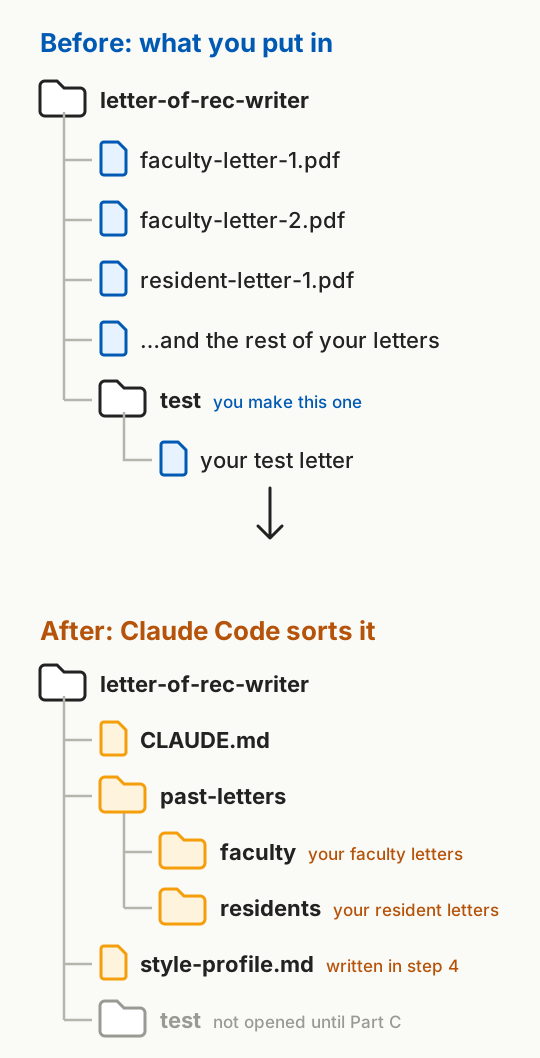
Make a new folder for the project, like ai-projects > letter-of-rec-writer, and drag all your past letters into it. Inside it, make a folder named test, and put your test letter there. Then open the project folder in Claude Code and paste this in:
I want to build a project in this folder that drafts letters of recommendation in my voice. My past letters are in this folder. Make a past-letters folder with one subfolder for each group of people I write for, like residents or faculty. Read each letter just enough to tell who it was for, and move it into the right subfolder. If you can't tell, ask me. Never open anything in the test folder until I ask you to compare. Then write a short CLAUDE.md that says what this project is for, how the folders are set up, and these privacy rules: never search the web for anyone named in these files, and never copy these files into another project. Include the rule about keeping the test folder unopened until I ask you to compare. Don't draft anything yet.
Check where it moved each letter, and read the CLAUDE.md it writes. For now, it only needs the basics. You'll add the steps for drafting a letter in Part B.
What's a CLAUDE.md file?
It's your project's standing notes for Claude Code: a short file in the project folder that Claude Code reads at the start of every session, so your workflow and privacy rules carry over. More in What Is a CLAUDE.md File?
4. Let it learn your style
Now have Claude Code read your letters and write down how you write:
Read every letter in past-letters (not test) and write a style profile: how I open, order paragraphs, and close; length for each group; my tone and favorite phrases; how I show evidence; how I describe my own role; and how I signal a strong versus a solid recommendation. Save it as style-profile.md. Then tell me the five most important things you learned, and ask me what's wrong or missing.
Read the whole profile, not just the five-point summary. The summary can sound right while a detail inside is off. Mine said I fill my letters with web metrics, like page views. I don't. I save those for candidates who worked with me on published content at ALiEMALiEM is the medical education website I founded in 2009. ALiEMU is its course platform.. When I have numbers for a candidate, I add two to four "wow numbers": figures that aren't in the CV and give the reader something new, like how many learners a project reached. So I told Claude Code, and it fixed the profile. Now it asks me before each letter whether I have numbers like these for the candidate.
Here's what your project folder looks like before and after Claude Code sets it up:
5. Let it interview you
Your letters don't show everything. They don't show what you never say, or the rules you follow without thinking. So ask:
Interview me one or two questions at a time about anything my letters don't show: how I handle weaknesses, how I sign my letters, things I never say, and whether some audiences, like promotion committees or award committees, get different rules. Add my answers to the style profile.
The weakness question was the useful one. My rule is to never mention a weakness unless the request asks for one, or unless I can explain a gap the reader will notice anyway. I asked Claude Code to ask me about weaknesses before every letter, and it added that to CLAUDE.md.
For promotion letters, I added two rules I follow without thinking. I almost always say what rank I'd expect them to hold at my institution. That's my own estimate, not a promotion committee's decision. And I mention national reputation at every rank, because it tells the committee the candidate is on track for full professor.
Part B: Draft a letter together
1. Give it the candidate's files
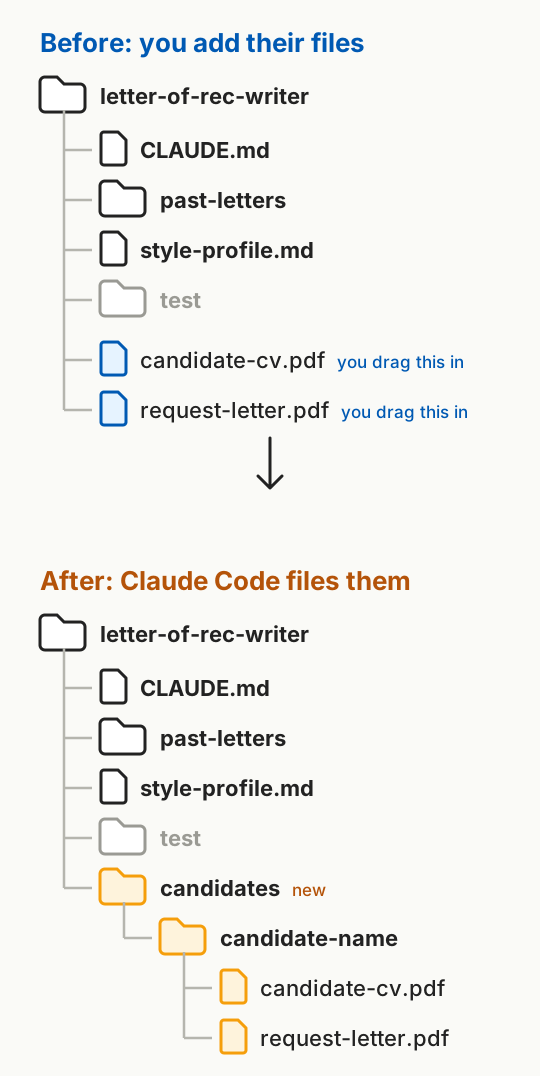
For your test, use the candidate whose letter you set aside in Part A. Drag the candidate's CV and the request into your project folder, then ask:
I just added a new candidate's CV and letter request to this project folder. Make a candidates folder with a folder for this candidate inside it, and move both files there. Then read them and tell me what the letter is for, who will read it (like a promotion or award committee), any formatting rules, and the strongest things in the CV.
Here's your project folder before and after this step:
2. Answer its questions
Next, Claude Code needs what only you know:
Now ask me one or two questions at a time: how I know them, two or three stories that show who they are, how they compare with their peers, and what I most want the reader to remember. Then write the letter and save it in a drafts folder. Use only facts from their files and my answers. If you're unsure of something, ask me instead of guessing. After the draft, list anything you still need me to confirm.
For your test, answer the way you would have back then, not with what you know now. If you can, dictate your answers.
3. Edit the AI draft
Read the AI draft and tell Claude Code what to change, the same way you'd edit any first draft. Claude Code and I finally agreed on draft four as the final version.
4. Save the steps for next time
Now that you've drafted one letter together, have Claude Code write down how you did it:
Add the steps we just followed to CLAUDE.md as the workflow for every letter: before interviewing me or drafting, read and apply style-profile.md for the candidate's group; make a folder in candidates for the candidate, read their CV and the request, interview me, write the draft in drafts, and revise it with my edits. Also add: never invent facts about the candidate. If something isn't in their files or my answers, ask me.
Next time, Claude Code follows the same steps without you pasting these prompts again.
Part C: Test it
1. Compare the AI draft with your real letter
Now have Claude Code compare your real letter and the latest AI-drafted letter:
Open the real letter in the test folder and compare it with your latest draft: structure and length, voice and word choice, which stories and points each one used, how strong the recommendation reads, anything you got wrong or made up, and what your draft did better. Save the comparison in test. End with suggested changes to the style profile or CLAUDE.md, with the reason for each. Don't change anything until I approve each one.
Here's what I discovered from comparing my real letter with the AI-drafted letter.
What matched. The AI draft got my line about the rank I'd expect this candidate to hold at my institution almost exactly right. It told the same story I did, about how I chose this candidate first for a role. Same warm tone. Nothing made up.
What was off. The AI draft was nearly twice as long, about 715 words to my 390, and it used headings. My real letter was five short paragraphs. The AI draft used the candidate's title where I used their first name. And it addressed the letter to the person who sent the request, not the chair, which is who I'd written to.
Where the numbers come from. The AI draft listed publication counts, which the committee can already read in the CV. When a candidate has worked with me on ALiEM content, I add "wow numbers" that aren't in their CV, like analytics from ALiEM and ALiEMU. My other Claude Code projects can already pull those analytics. They're what I can add that no one else can.
What surprised me. The interview. Claude Code asked concrete questions about how I worked with the candidate, and it followed up on my answers. That drew out stories I'd left out of my own letter, so the AI draft showed more of how the candidate led, where my real letter mostly listed titles. The AI draft also tied each point to the criteria in the university's request.
2. Decide which changes to keep
Claude Code suggested changes to the style profile and CLAUDE.md. I approved six:
- Use the candidate's first name after the opening paragraph.
- Pick numbers that show scale and selectivity, not counts the committee can read in the CV.
- Skip clinical skills for faculty outside my institution. I usually work at a different institution and haven't seen the candidate care for patients. Instead, name the areas I've seen myself, like teaching and leadership, using the institution's own terms for them.
- Signal a strong recommendation the way I do, with "enthusiastically endorse," not "my strongest recommendation without reservation."
- Ask me whom to address the letter to when the request didn't come from the chair.
- Draft two versions every time: a short letter of about five paragraphs, and a long one with headings that follow the committee's criteria. I choose.
Comparing your real letter with the AI draft shows where they differ. Claude Code turns those differences into suggested changes to how it drafts, and you decide which ones to keep.
One test isn't the finish line
This isn't a build-it-once project. Every letter is another roundIt's not all good news. As rules pile up, Claude Code can overshoot and overengineer for the candidate at hand. Each round, I pull it back..
After I finish editing a letter, I end the session with one more question:
Before we finish, is there anything from this session that should change the style profile or CLAUDE.md for future letters? Suggest each change with the reason, and don't make any until I approve them.
A phrase I keep fixing goes into the style profile. A question I wish it had asked goes into the interview. I'm always adjusting the steps, the style, and the voice, and each AI-drafted letter starts a little closer to what I'd write in reality.
With each letter, you will hopefully make fewer and fewer edits, as it "learns" your voice and writing style.