
When I started learning Claude Code, the tutorials I watched kept showing a file called CLAUDE.md. I was curious, but I didn't know what it was for.
Then I started a project of my own. I spent a whole session explaining what I wanted and how I wanted it done. When I opened a new session, none of it was there. Claude Code didn't remember my instructions or anything we'd worked through.
I almost gave upIt felt like Groundhog Day, one of my favorite movies. Same day, same speech, and nobody remembered it.. Did I have to finish every project in one session? Or paste all my instructions back in each time I started over?
Neither. That's what CLAUDE.md is for.
Standing orders for your project
Every new session starts with an empty context window. It doesn't carry over your last conversation. CLAUDE.md fills that gap.
It's a plain text file in your project folder, written in Markdown. Claude Code reads it at the start of every session, before you type anything.
Think of standing orders in the emergency department. A patient with chest pain gets an ECG at triage. The nurse doesn't wait for a doctor to order it. Someone wrote that rule once, and it applies to every patient, every shift.
CLAUDE.md works the same way. You write your rules once, and every session starts with them.
How to make one
You don't have to write it yourself. Ask Claude Code:
Create a CLAUDE.md file for this project. Ask me any questions you need first.
Or type /init. Claude Code looks through what's already in your project folder and writes a first draftInit is short for initialize, a programmer's word for "set up.". If you already have a CLAUDE.md, it suggests improvements instead of replacing it.
Timing matters. /init works from what's in the folder, so it has more to go on once you've done some work. In a new, empty folder, there's nothing to read yet. Ask Claude Code to interview you first and then write the file. That's how the PubMed literature monitor starts.
Either way, read what it wrote. It's your file. Ask for changes until it matches what you want.
Then keep it current. When you catch yourself telling Claude Code the same thing twice, say "Add that to CLAUDE.md." Before you close a session, you can ask, "Is there anything from today that belongs in CLAUDE.md?"
What goes in
Things that are true in every session:
- Who you are and who the project is for
- What the project does
- Your rules, like "Explain things in plain English. I'm not a coder."
What stays out:
- Anything Claude Code can figure out by looking through your folder
- What you're working on today. That goes in a hand-off summary, not your standing orders.
Keep it short
Anthropic, the company that makes Claude, recommends keeping each CLAUDE.md under 200 lines. There are two reasons.
It fills the context window on every turn. Claude Code loads the whole file when a session starts, and it stays in the context window for every message after that. Every line uses space your actual work could use.
Long files are followed less reliably. The more rules there are, the easier it is for one to get missed. A one-page set of standing orders gets followed. A 40-page set gets skimmed.
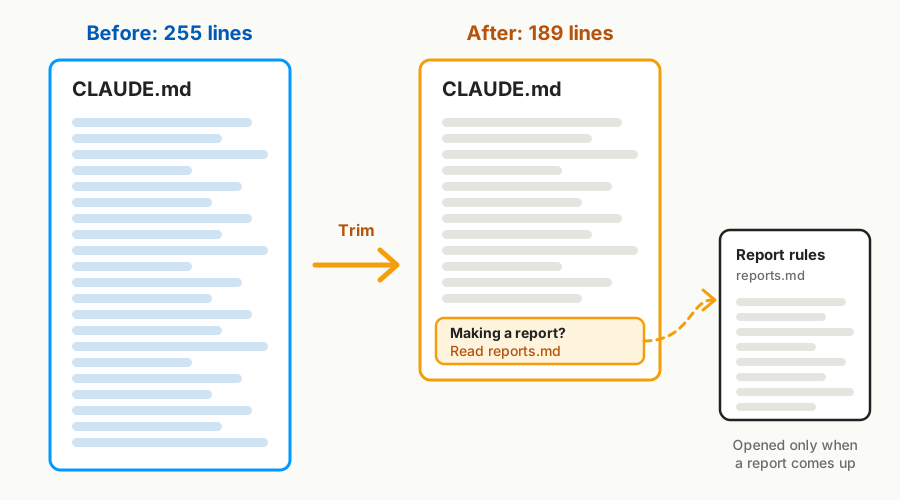
Most of my projects have CLAUDE.md files well under 200 lines. One of them grew to 255 lines as I kept adding rules. So I asked Claude Code to trim it. It moved the rules for occasional tasks, like making a special report, into a second file. In their place, it left a one-line note: when that task comes up, read the other file. Now CLAUDE.md is 189 lines, and the report rules load only when there's a report to make.
Write your rules into CLAUDE.md once. Every session starts with them.
If you built the PubMed literature monitor, open its CLAUDE.md and read it. Every answer you gave in the interview is in there.