
For months, I ignored Git and GitHub while I learned Claude Code on my desktop Mac. Software engineers threw the words around as if everyone knew them, and I wasn't ready to make room in my brain for them. They came with their own vocabulary, too: "commit," "push," "pull."
They turned out to be simpler than I thought, especially when you're the only one working on your projects. Here's what I wish someone had told me at the start.
Git and GitHub are two different things that work together:
- Git is a free version control program: it saves versions of your project's files each time you commit. It lives on your computer.
- GitHub is a website that stores a copy of those files and that record online, so other computers can reach them.
Six words to use in chat
You don't need to type Git commands. You can say these to Claude Code in plain English.
| Say this to Claude Code | What it does |
|---|---|
| "Commit this." | Saves your files as they are right now, with a short note: what changed, who made the change, and when. |
| "Push to GitHub." | Sends your new commits, and the files in them, from your computer up to GitHub. |
| "Pull from GitHub." | Brings new commits, and the files in them, down from GitHub to your computer. |
| "Are we on main?" | Main is the main line of commits: the current, official version of your project. |
| "Do this on a new branch." | A branch is a side line of commits, so you can try something without changing main. |
| "Merge this branch into main." | Brings a branch's commits back into main. |
Git: saved versions on your computer
Each time you commit, Git takes a snapshot of your files and freezes it, with a note on what changed. Git keeps every snapshot in order. So you can go back to any earlier one, and see what changed between one save and the next. It's a paper trail for your files.
If you use Time Machine on your Mac, it's a similar idea, with two differences. Time Machine backs up on its own, on a schedule. Git saves only when you commit, and each save comes with a note saying what changed.
Git works on your computer. You don't need an account or the internet to use it. A new Mac doesn't come with Git ready to use, though. The first time anything runs git, macOS offers to install Apple's Command Line Tools, which include it.
GitHub: a copy online
GitHub is a website that holds a copy of your project's files and all its commits, so other computers can see the same work.
If you're thinking "so it's Dropbox," you're close. GitHub does hold your files. But it differs in two ways: it only updates when you push, and it keeps every saved version with a note on what changed.
That matters to me because I work on two Macs, a desktop and a laptop. Each Mac keeps its own full copy of the history. GitHub is the copy in the middle that both of them reach.
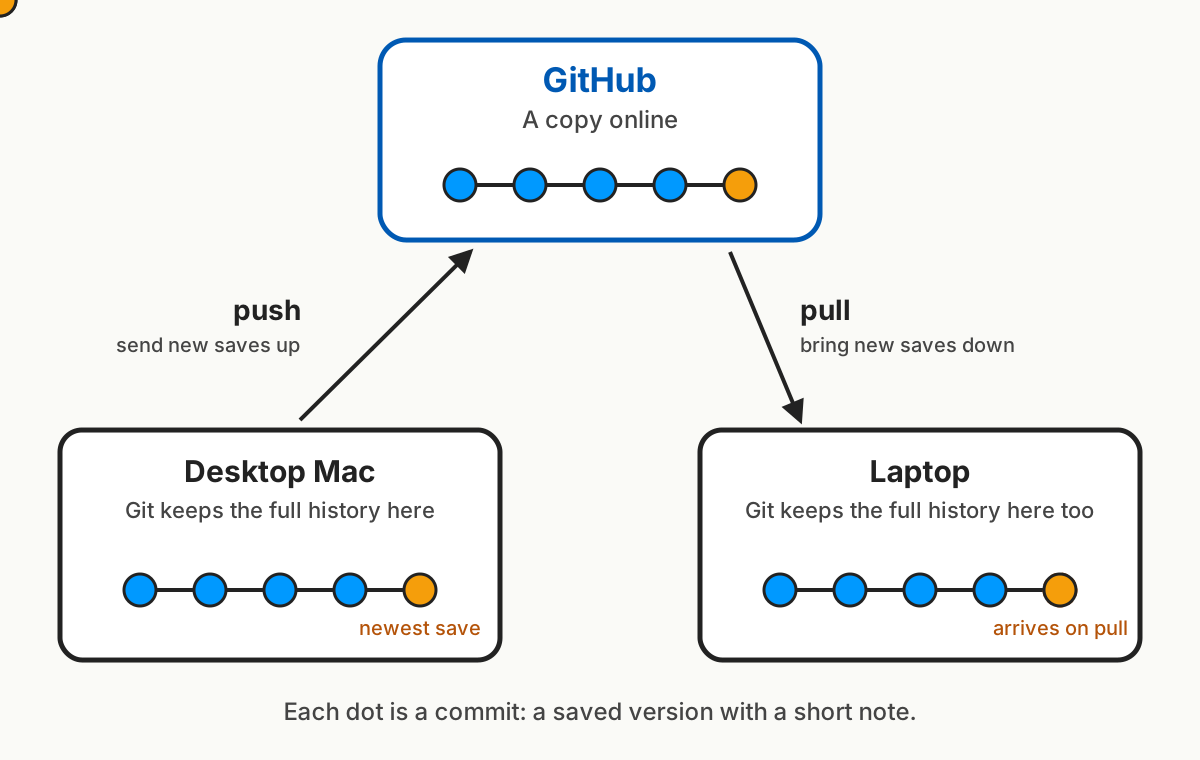
So my routine is:
- Pull at the start of a session: bring down any new commits from GitHub.
- Push at the end: send my new commits up to GitHub.
Here's what that looks like with three made-up commits from one morning's work on a blog:
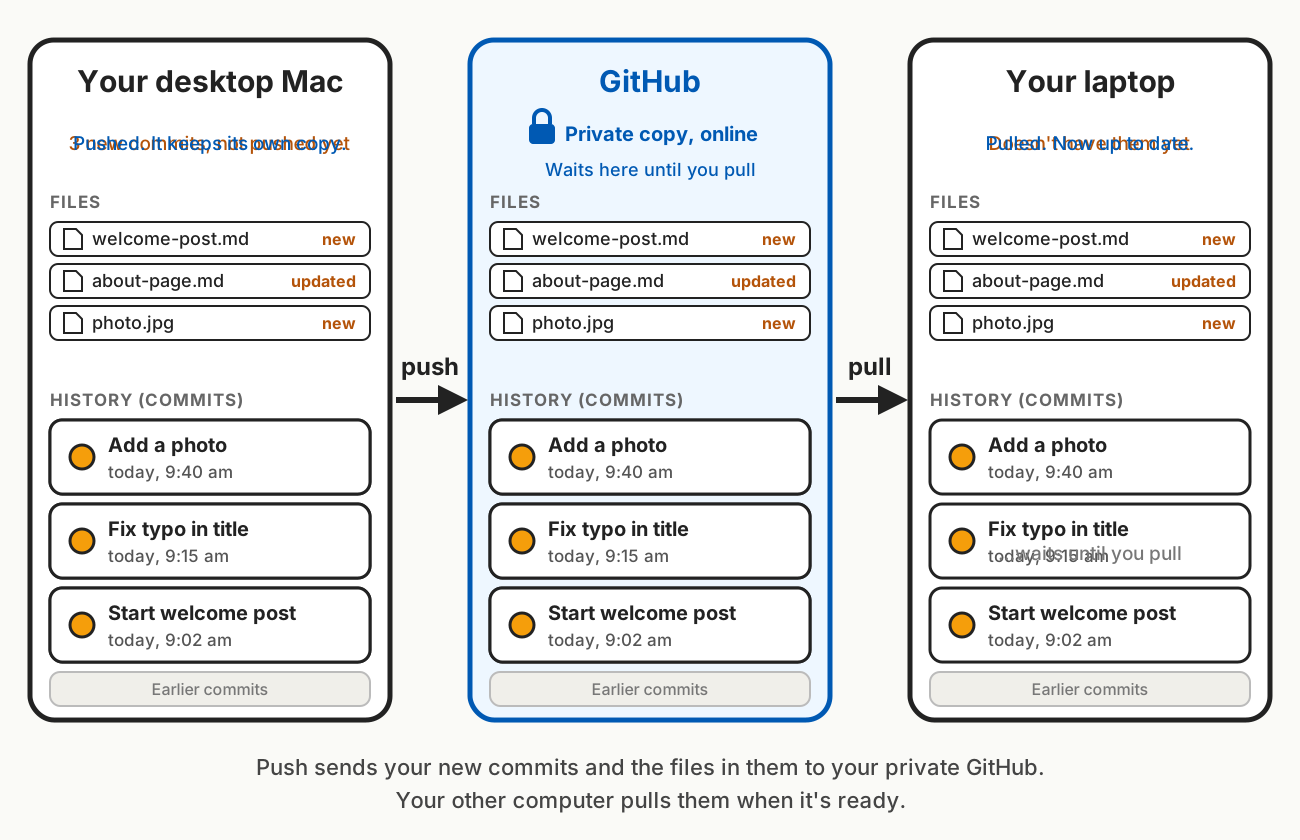
Nothing moves on its own. If I forget to push from my laptop, my desktop never sees that work. If my laptop pushed something my desktop hasn't pulled yet, GitHub turns away the desktop's push until the two copies are matched upThis sounds scary, but it protects you: it stops one Mac from quietly overwriting the other's work. Claude Code can match them up for you..
My copy on GitHub is privateGitHub lets you choose who can see each project. Mine is visible only to me.. Nobody else can read it unless I invite them.
Git keeps the saved versions. GitHub keeps a copy where my other computers can reach it.
What if I only use one computer?
You still want Git. Its save points are what let you undo a change Claude Code made that you don't like.
GitHub is optional with one computer, but I'd still use it. It's a backup that lives off your Mac, so your work survives if your computer dies or gets lost. If you add a second computer later, ask Claude Code to sign in to GitHub and download your project there. Then it's the same pull-and-push routine.
Setting up GitHub
A GitHub account is free, and a free account can hold as many private projects as you like. GitHub calls each project a repository, or "repo."
Make an account at github.com. Then, in your project folder, ask Claude Code: "Help me put this project in a private GitHub repo." It walks you through a one-time sign-in in your browser that connects your Mac to your account. You don't need to set up an API key or a connector for this.
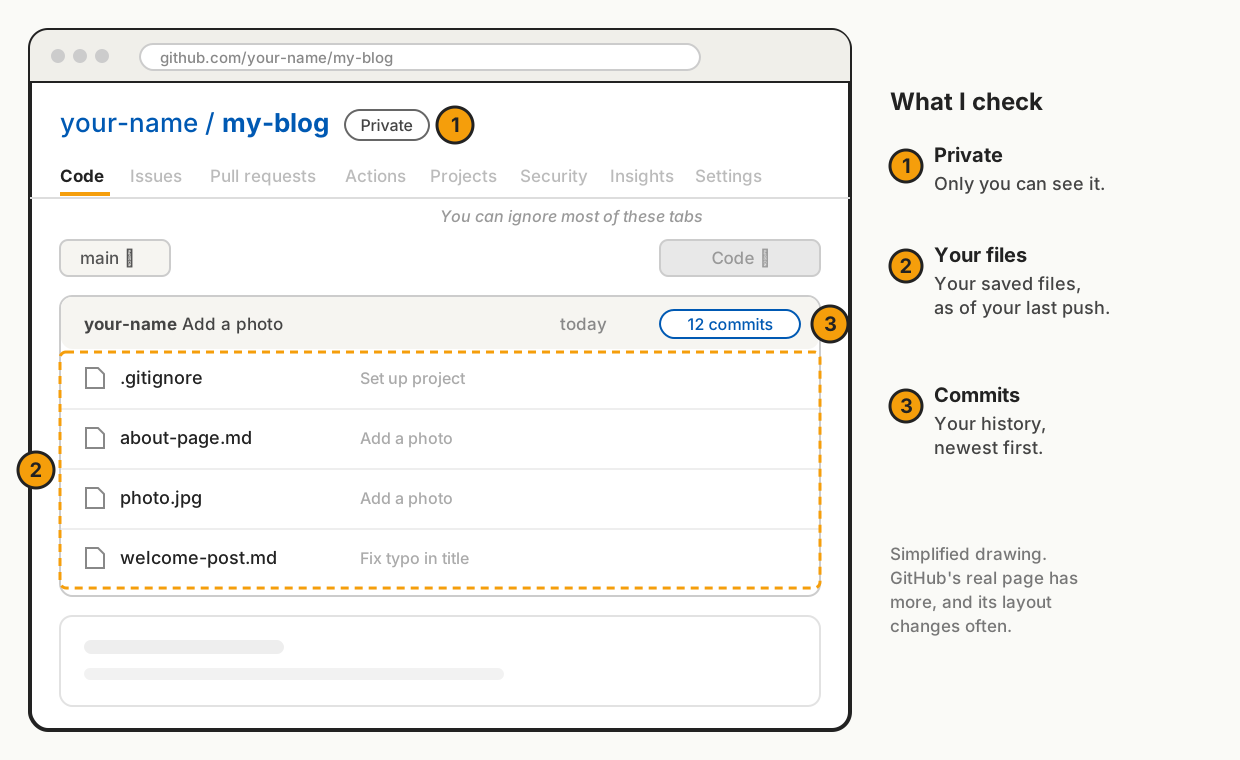
The first time I opened GitHub, the layout daunted me. Tabs, buttons, and menus I didn't understand. It turns out you rarely need to be there. GitHub is a relay station between your computers, and Claude Code handles the pushing and pulling. When I do look, I check three things:
Main and branches
Main is the official version of your project. A branch splits off from main so you can make commits without changing main. When the work is ready, the branch merges back in.
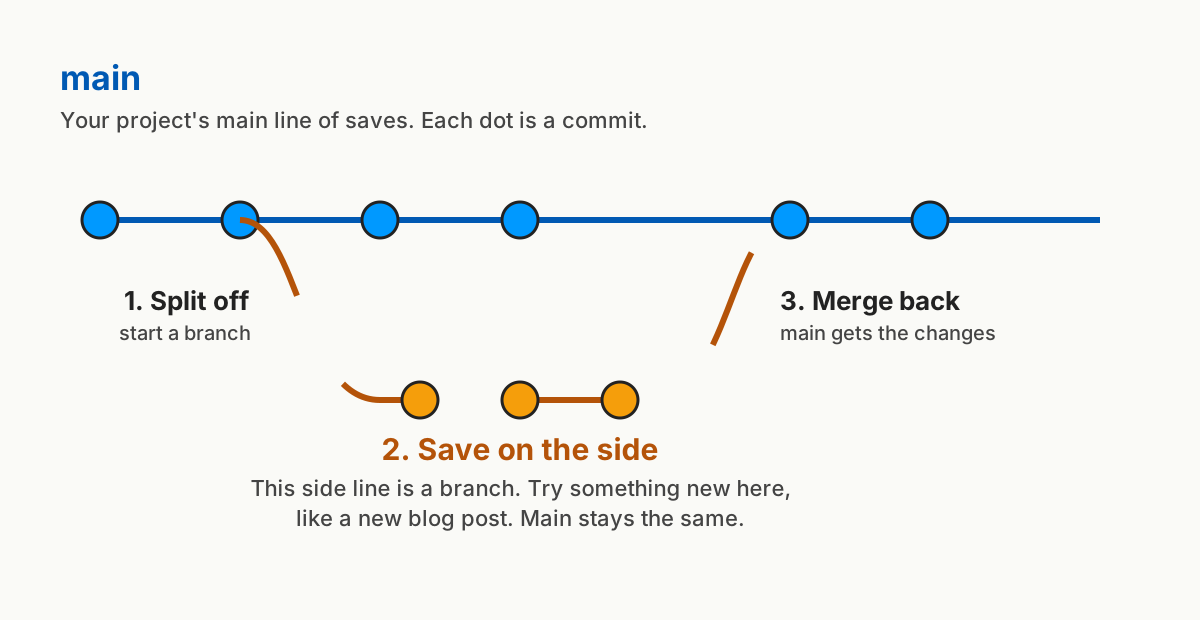
I work alone, so most of my work ends up straight on main. Branches matter when I run two Claude Code sessions at once. Each session gets its own copy of the project on its own branch, so one doesn't overwrite the other. When the work is ready, I ask Claude Code to merge it into main.
Claude Code runs Git for me
I don't type Git commands. Claude Code does. When a session starts, it gets a quick snapshot: which branch it's on, whether anything is unsaved, and the last few commits. When it commits, it writes the note for me.
You can tell Claude Code when to commit: "commit this."
Not every file goes into a commit. A project can have a file called .gitignore, a list of files Git should skip. It's where you list your .env file, the file that holds your passwords and keys. Mine is called .env.local, and it's on my .gitignore list, so Git never saves it and it never goes up to GitHub.
When to save
A commit is a save point you can go back to. I commit:
- When something works. The page looks right, the build passes. Save it before you change anything else.
- Before a big change. If Claude Code is about to rewrite a lot, a commit right before means I can go back.
- At the end of a session. That way, everything I did is saved in Git, and the next session starts from the latest version, on either Mac. Then push, so GitHub has it too.
Several small commits are easier to undo than one big one at the end of the day. And remember the difference:
- Commit saves a version on your computer.
- Push sends your commits to GitHub.
Where to start
Open a project folder in Claude Code and ask: "Is this folder using Git? If not, set it up, make sure files with passwords and keys are left out, and make a first commit." After that, say "commit this" whenever something works.
Once you have a few commits, ask: "Show me the last three commits and explain each one in plain English." Reading them back is the fastest way I've found to see what's changed, and when.