
API stands for "application programming interface." The name doesn't explain much.
Think of an online tool as a hospital. Its website is the front entrance: you walk in, follow the signs, and click your way to what you need. An API is the staff entrance. A program uses it to go straight to what it needs, without ever opening the website. Many tools hand out a badge for that entrance, called an API key. More on keys below.
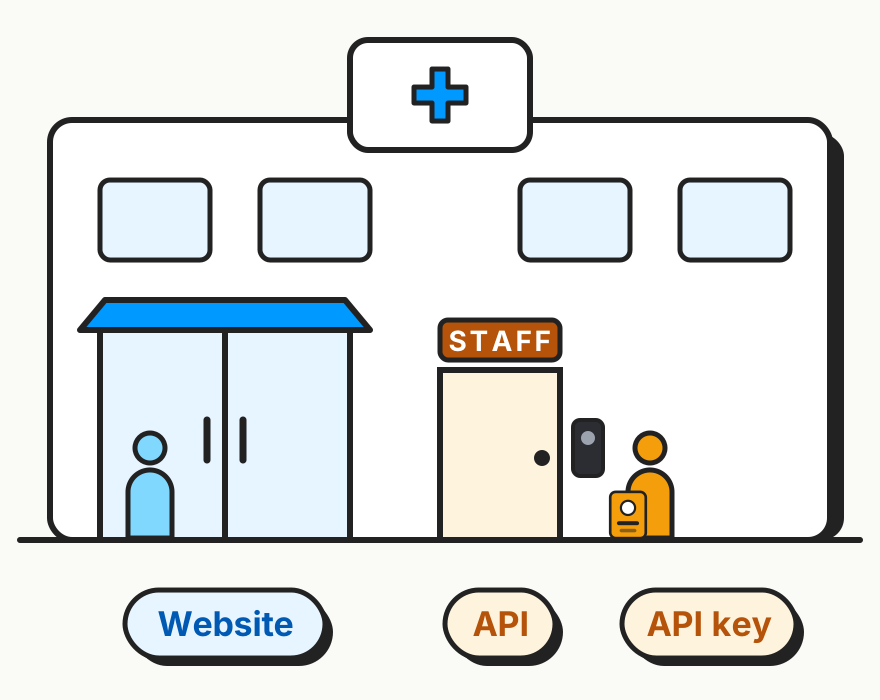
Through the API, a program sends the tool a request in a format it understands, like "find papers from this week" or "make a new form." The tool does it and sends back an answer.
Many online tools have an API, free and paid ones alike. Tools that have one publish instructions for it, and Claude Code can read those instructions for you.
Three APIs I use
The examples below use Claude Code in the Mac Claude desktop app.
1. PubMed: a weekly search for new papers
PubMed is the search engine every clinician knows. It has an API too, run by the National Library of Medicine.
I help with dissemination for PECARNThe Pediatric Emergency Care Applied Research Network, a research group in pediatric emergency medicine., and I keep a current list of its publications. Every week, a small program on my Mac runs on its own and uses PubMed's API to search for new papers that mention PECARN. I don't have to start it, and I never type the search into PubMed myself.
So much of what we do in academic medicine, we still run by hand. This is one less thing.
2. Kit: emails that send themselves
Kit runs my email newsletter. On paid plans, Kit can email subscribers automatically whenever a blog has a new post. I'm on the free plan, which doesn't include that. So Claude Code used Kit's API to build that step for me: when I publish a new post, a small program creates an email for it in Kit and tells Kit to send it to my subscribers.
The program runs on Netlify, the service that hosts this website, not on my laptop. So the email goes out even when my computer is off.
I'd never set up a professional email newsletter before. I didn't learn Kit's settings to do it. I described what I wanted to Claude Code in plain English, and it built the email automation from my blog posts.
3. Tally: rebuilding forms for free
Tally is an online form builder. I used its API to rebuild the "choose your own adventure" case forms for GroundED, an ALiEMU course. They used to live in Typeform.
Typeform was getting expensive, and my forms didn't need anything fancy enough to justify a monthly subscriptionMy goal these days: cancel paid subscriptions wherever a free tool plus Claude Code can do the job. Typeform was one of them.. Tally is free, and the design is more professional than Google Forms. It also has an API, which made it the right fit.
Each form branches. Pick one answer and you jump to one page of the case. Pick another and you land somewhere else. Rebuilding four weeks of these by hand would have taken me about 8 hours, with checking and rechecking, and I'd probably still have made mistakes.
Claude Code read the old forms and built the new ones in Tally through the API, branching and all.
What the three have in common
Claude Code wrote the code for all three. I didn't read PubMed's, Kit's, or Tally's API instructions. Claude Code did. I still check the results before anything runs on its own.
Two of the three run without me. The PubMed search runs every week on my Mac, and the Kit email goes out after each new post.
That's why I've started using Claude Code as my one place to work. Instead of opening a dozen websites, I tell Claude Code what I'd normally do on them. It uses each tool's API, either right then or by building a small program that keeps doing the job.
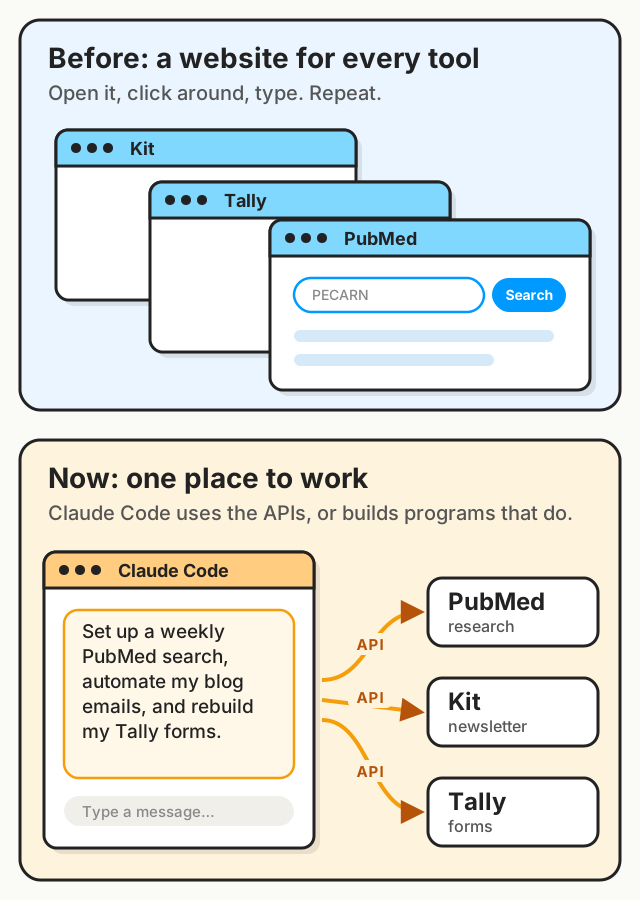
The API is the way in. The program Claude Code builds is what does the same steps every time.
API keys: passwords for programs
Kit and Tally each gave me an API key. It's a password for programs, so a program can prove it's allowed in. On my computer, keys live in a settings file called a .env file. The Kit key is also saved in a private setting on Netlify, since that's where the email program runs. PubMed doesn't require a key at all.
Not every API is free
None of my three charge for API access:
- Kit: the API works on Kit's free plan, which is the plan I'm on.
- Tally: the API is free for every Tally user.
- PubMed: free. You can get a free key to make more requests per second, but you don't need one.
Other APIs charge money. Before you build on one, check the tool's API page for pricing, or ask Claude Code to check.
The downsides
Connecting Claude Code to your accounts is powerful. It also means trusting more things with them.
A key is a password, and it can leak.
The code is yours to maintain. When a tool changes its API, an automation can stop working until it's updated. Claude Code can help with that.
An automation that runs without you can also make mistakes without you.
Anything an AI reads can carry instructions meant to trick it. An email from a stranger or a shared document could include hidden text telling Claude to do something you didn't ask for. If Claude reads what comes back from an API, the same is true. Limit what Claude can access, choose limited-access keys when the service offers them, and review sensitive actions before approving them.
Where to start
Next time you catch yourself doing the same thing on a website every week, ask Claude Code: "Does this tool have an API, and what could you build with it?" If it needs a key, ask Claude Code to find the service's current instructions and walk you through them.