
Claude Code builds my online courses in WordPress. It doesn't log in the way I do.
There's no login page. No clicking every picture with a traffic light, no "I'm not a robot" checkbox. It uses an app password.
I made my first one by following Claude Code's instructions. WordPress asked for a name, gave me a string of letters, and I pasted it where I was told. It worked. Here's what I wish I'd known before I made it.
What is an app password?
An app password is a second password to your account. It works as you.
Anyone who has it can do anything you can, including change your real password and lock you out.
That last part surprised me. I'd assumed "app password" meant something smaller and safer than my real password, like a guest pass. It isn't. On my WordPress site, I'm an administrator, so my app password is an administrator too.
The difference is how it gets used. My regular password is for me, typing into the login page. An app password is for a tool, talking to WordPress directly through its back-end connectionThe technical name is the WordPress REST API. You don't need to know it to use one.. You can't use an app password to log in to the dashboard yourself. Tools can use it to do everything else.
Why it's worth having
I co-created ALiEMU, a free online learning site for emergency medicine. Every course module there takes a lot of clicking to set up.
By hand, one module means uploading the course, clicking through dozens of settings, and building the quiz. A quiz has 6 to 10 questions. Each question needs the question itself, every answer option, the correct answer, the explanation, and a save. Then the badge with its credit hours. Then the featured image. Then a companion post on ALiEM.
It takes about 2 hours if you know every step, and longer if you don't.
I once wrote a step-by-step manual for a freelancer to do this. Something still went wrong every time.Not their fault. There are just that many screens.
With an app password, Claude Code does all of that uploading, copying, pasting, clicking, and toggling in about 10 minutes. That's about 2 hours of busywork I don't do anymore. It does every step the same way every time. I still do a couple of things by hand, like picking the quiz template and the SEO settings, and reviewing the content takes as long as it always has. Then I hit publish.
That's the trade. An app password gives a tool the keys to your account. In return, it does the clicking.
How to make one in WordPress
- Log in to your WordPress dashboard.
- Go to Users → Profile.
- Scroll to the bottom, to Application Passwords.
- Type a name you'll recognize later, like
ALIEM_WP_APP_PASSWORD. - Click Add Application Password.
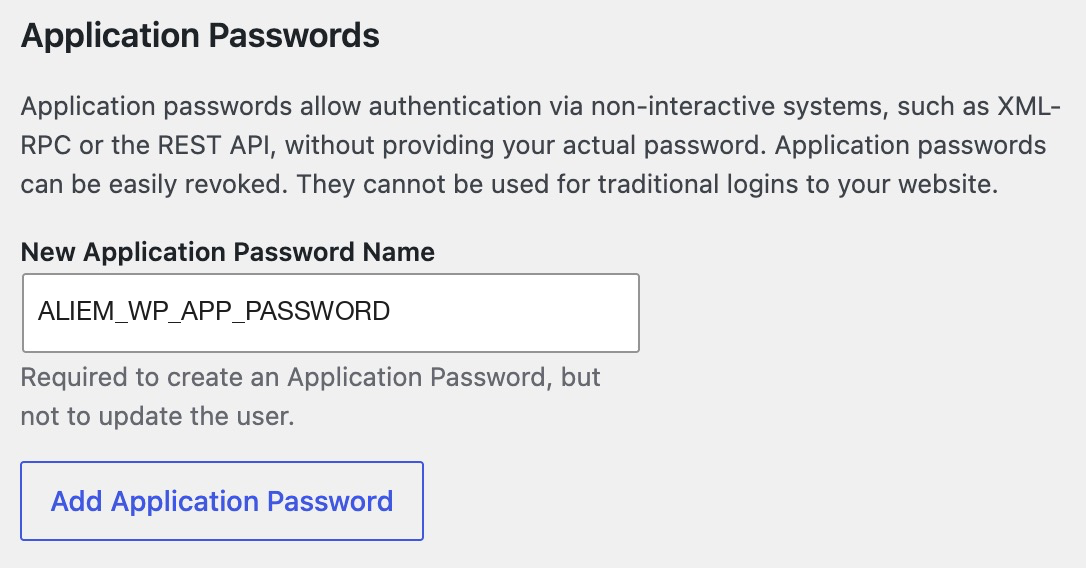
WordPress shows you a 24-character password in groups of four, something like abcd efgh ijkl mnop qrst uvwx. It shows it once. Close that screen and it's gone, so copy it right away.
Make one app password per tool. If you stop using a tool, or something goes wrong with one, you can delete that one password from the same screen and everything else keeps working.
Where it goes
Not in the chat.
When Claude Code needs the password, it goes in a small hidden settings file on your own computer. Claude Code reads it from there when it needs it. You don't paste it into a conversation, a Google Doc, or a screenshot. I explain that file in What Is a .env File?
An app password isn't a lesser password. It's your password, made for a tool.
One habit to start with
Treat it like your real password, because it is one.
I learned that the hard way. Claude Code once showed my app password right in our chatShort version: I replaced it, and Claude Code now has a rule about it.. Here's what happened, and what I did about it.